WordPress Permalink With IIS 6 Using IIRF

Previously i’m using Isapi_Writer 3.0 from HeliconTech to use permalink for WordPress but sadly it not goes smoothly, i got problem with the permalink, it turn off randomly and get another 404 page, so i try another method, now i try using IIRF (can be download it here) and use this in IIRF.ini :

1
2
3
4
5
6
7
8
9
RewriteBase /
RewriteCond %{REQUEST_FILENAME} !-f
RewriteCond %{REQUEST_FILENAME} !-d                                
RewriteRule ^/sitemap.xml$   - [L]

RewriteRule ^wp-(.*)$ /wp-$1 [L]
RewriteRule ^xmlrpc(.*)$ /xmlrpc$1 [L]

RewriteRule ^(index.php)*(.*)$ index.php/$2 [NC,L]

Now it’s really fixed, i hope 😀

Update : Again i got another 404 Page
so i change the RewriteRule to

1
RewriteRule ^(index.php)*(.*)$ index.php/$1 [NC,L]

WordPress Permalink With IIS 6

Update : Please see this wordpress-permalink-with-iis-6-using-iirf/ i got problem using isapi_writer 3.0 method.

Ok, After i’m moving my site to the new server that run on windows server 2003, i got problem using the WordPress Permalink. Previously i’m using Windows Server 2008 hosting and got no problem with the permalink, on Windows Server 2008 with IIS 7 and Mod_Writer plugin, i only need to put this on my web.config :

1
2
3
4
5
6
7
8
9
10
11
12
13
14
<system.webServer>
        <rewrite>
          <rules>
            <rule name="Main Rule" stopProcessing="true">
              <match url=".*" />
              <conditions logicalGrouping="MatchAll">
                <add input="{REQUEST_FILENAME}" matchType="IsFile" negate="true" />
                <add input="{REQUEST_FILENAME}" matchType="IsDirectory" negate="true" />
              </conditions>
              <action type="Rewrite" url="index.php" />
            </rule>
          </rules>
        </rewrite>
</system.webServer>

And when i move to new server, there’s no Mod_Writer for IIS 6, so alternatively i use ISAPI_Rewrite 3.0 from HeliconTech. But When i follow the instruction how to install it in permalink-for-wordpress-iis-6-mod_rewrite-fixed-free, i got 404 Page when i follow my post. So after a week finding solution, i finally see this 404-wordpress-permalinks-iis-with-isapi-rewrite and just put this on my httpd.conf

1
2
3
4
5
6
RewriteBase /
RewriteCond ${REQUEST_FILENAME} !-f
RewriteCond ${REQUEST_FILENAME} !-d
RewriteRule /wp-(.*) /wp-$1 [L]

RewriteRule ^(index.php)*(.*)$ index.php/$2 [NC,L]

and voila… my site is fixed 😀

Default Gateway 0.0.0.0 in Windows 7

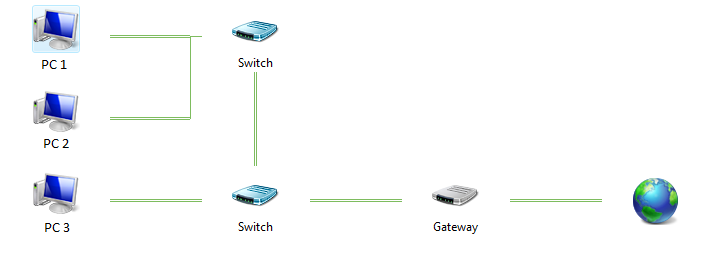
I have this schematic LAN config :

I’m using PC 1, and after i update some software, restart the Computer, suddenly i can’t connect to the internet. So i tried “ipconfig /renew”, tried “ipconfig /release” then “ipconfig /renew”, tried unplugging network cables, tried disabling local network adapet, it’s no use. I can ping to my local network but can’t ping to internet. And i try typing ipconfig /all and i see there’s Deafult Gateway 0.0.0.0

i search google for the problem and find the solusion using netsh
just type :

1
netsh interface ipv4 delete address "Local Area Connection" addr=a.b.c.d gateway=0.0.0.0

where a.b.c.d is your local ip address. And my internet is back online.

IIS5 : php No input file specified on Virtual Directory

I got the problem when installing PHP5 with WPI and install it on IIS5 Windows XP, i can’t execute php file in my virtual directory, and got “No input file specified” when it try execute the file.

After i search it finally i got the solution for this problem, and it’s very simple, just edit this line in PHP.ini file :

1
2
3
4
5
6
; The root of the PHP pages, used only if nonempty.
; if PHP was not compiled with FORCE_REDIRECT, you SHOULD set doc_root
; if you are running php as a CGI under any web server (other than IIS)
; see documentation for security issues. The alternate is to use the
; cgi.force_redirect configuration below
doc_root =

change it to :

1
2
3
4
5
6
;The root of the PHP pages, used only if nonempty.
; if PHP was not compiled with FORCE_REDIRECT, you SHOULD set doc_root
; if you are running php as a CGI under any web server (other than IIS)
; see documentation for security issues.  The alternate is to use the
; cgi.force_redirect configuration below
;doc_root =

Goodluck for trying it.