Again i’m moving my site, i hope this will be the last time i’m moving.
Blog is completely moved, and no problem got problem with permalink, i must use index.php to ge it work 🙁
Moving Done !! (Again…)
Reply

Again i’m moving my site, i hope this will be the last time i’m moving.
Blog is completely moved, and no problem got problem with permalink, i must use index.php to ge it work 🙁
Microsoft Shuts off HTTPS in Hotmail for Over a Dozen Countries
Your Windows Live ID can’t use HTTPS automatically because this feature is not available for your account type.
Hotmail users in the affected countries can turn the always-use-HTTPS feature back on by changing the country in their profile to any of the countries in which this feature has not been disabled, such as the United States, Germany, France, Israel, or Turkey. Hotmail users who browse the web with Firefox may force the use of HTTPS by default—while using any Hotmail location setting—by installing the HTTPS Everywhere Firefox plug-in.
source : https://www.eff.org/deeplinks/2011/03/microsoft-shuts-https-hotmail-over-dozen-countries
Here’s some SQL Query to get Two Digit Year, Month and Date
Year :
1 | print right(year(getdate()), 2) |
result :
11
Month :
1 | print right('0' + month(getdate()), 2) |
result :
03
Date :
1 | print right('0' + day(getdate()), 2) |
result :
26
I got problem when using RTSeven Lite after loading the iso image, i got power loss and when i start my computer and run RTSeven Lite it says First unmount following wim bla…bla…bla….
So if everyone got this problem, it’s simple to fix this, use this step :
1 2 3 | Run cmd type dism /cleanup-wim done ! |
it simple isn’t it 🙂
I have this schematic LAN config :
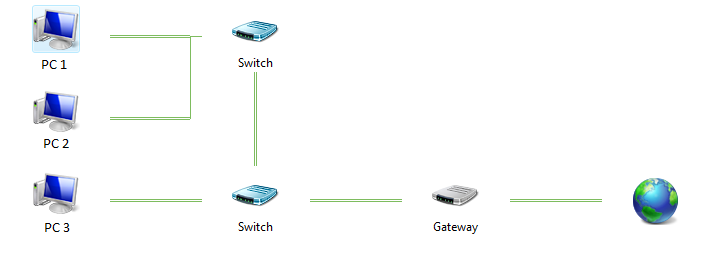
I’m using PC 1, and after i update some software, restart the Computer, suddenly i can’t connect to the internet. So i tried “ipconfig /renew”, tried “ipconfig /release” then “ipconfig /renew”, tried unplugging network cables, tried disabling local network adapet, it’s no use. I can ping to my local network but can’t ping to internet. And i try typing ipconfig /all and i see there’s Deafult Gateway 0.0.0.0
i search google for the problem and find the solusion using netsh
just type :
1 | netsh interface ipv4 delete address "Local Area Connection" addr=a.b.c.d gateway=0.0.0.0 |
where a.b.c.d is your local ip address. And my internet is back online.